
JOINS
Joins are used in relational databases to combine data from multiple tables based on a common column between them. A foreign key may be used to reference a row in another table and join can be done based on those columns.
CROSS JOIN
CROSS JOIN returns the cartesian product of rows from the tables in the join. It combines each row of the first table with each row of the second table. If there are X rows in the first table and Y rows in the second table then the number of rows in the joined table will be X*Y.

In the above diagram shown, let Table A has 3 rows and Table B has 3 rows. All the rows of Table A will be combined with all the rows of Table B. The number of rows in the joined table will be 3*3 = 9.
For example,
| vehicle_type |
|---|
| vehicles |
| Bike |
| Car |
| Jeep |
The above table ‘vehicle_type’ has one column named vehicles which contain types of vehicles.
| vehicle_color |
|---|
| color |
| Black |
| White |
| Grey |
The above table ‘vehicle_color’ also has one column which contains the color of the vehicles.
| vehicle_details | |
|---|---|
| vehicles | color |
| Bike | Black |
| Bike | White |
| Bike | Grey |
| Car | Black |
| Car | White |
| Car | Grey |
| Jeep | Black |
| Jeep | White |
| Jeep | Grey |
The above table named ‘vehicle_details’ is the final table after the join.
In the above-shown example, there are 3 rows in the first table and 3 rows in the second table, and 3*3=9 rows in the joined table.
INNER JOIN
The INNER JOIN produces the output by combining those rows which have matching column values. Those rows from the two tables are combined and selected in the joined table which has the same value for the common column.
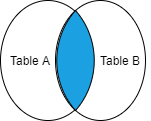
The above picture is the diagrammatic representation of the INNER JOIN of two tables. The colored area shows the joined table.
For example,
| product_details | ||
|---|---|---|
| id | year | units |
| 7 | 2018 | 32 |
| 8 | 2019 | 23 |
| 9 | 2020 | 13 |
| 8 | 2018 | 25 |
The above table named ‘product_details’ having three attributes id, year and units show the number of units purchased by customers in respective years.
| customer | |
|---|---|
| id | name |
| 7 | Ankit |
| 9 | Ashish |
The above table ‘customer’ contains the names of customers associated with different ids.
| purchase_details | |||
|---|---|---|---|
| id | year | units | name |
| 7 | 2018 | 32 | Ankit |
| 9 | 2020 | 13 | Ashish |
The above table ‘purchase_details’ is the final table after the join.
In the above-shown example, the third table is the output of the INNER JOIN of the first and second tables.
LEFT OUTER JOIN
The LEFT OUTER JOIN which is also called LEFT JOIN returns all the rows from the left table ‘A’ and the matching rows from the right table ‘B’ in the join. The rows from the left table, which have no matching values in the right table will be returned with a NULL value in the link column.
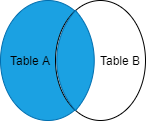
The above picture is the diagrammatic representation of the LEFT OUTER JOIN of two tables. The colored area shows the joined table.
For example,
| product_details | ||
|---|---|---|
| id | year | units |
| 7 | 2018 | 32 |
| 8 | 2019 | 23 |
| 9 | 2020 | 13 |
| 8 | 2018 | 25 |
The above table named ‘product_details’ having three attributes id, year and units shows the number of units purchased by customers in respective years.
| customer | |
|---|---|
| id | name |
| 7 | Ankit |
| 9 | Ashish |
The above table ‘customer’ contains the names of customers associated with different ids.
| purchase_details | |||
|---|---|---|---|
| id | year | units | name |
| 7 | 2018 | 32 | Ankit |
| 8 | 2019 | 23 | NULL |
| 9 | 2020 | 13 | Ashish |
| 8 | 2018 | 25 | NULL |
The above table ‘purchase_details’ is the final table after the join.
In the above-shown example, the third table is the output of the LEFT JOIN of the first and second tables.
RIGHT OUTER JOIN
The RIGHT OUTER JOIN which is also called RIGHT JOIN returns all the rows from the right table ‘B’ and the matching rows from the left table ‘A’ in the join. The rows from the right table, which have no matching values in the left table will be returned with a NULL value in the link column.
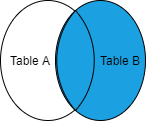
The above picture is the diagrammatic representation of the RIGHT OUTER JOIN of two tables. The colored area shows the joined table.
For example,
| product_details | ||
|---|---|---|
| id | year | units |
| 7 | 2018 | 32 |
| 8 | 2019 | 23 |
| 9 | 2020 | 13 |
| 8 | 2018 | 25 |
The above table named ‘product_details’ having three attributes id, year and units show the number of units purchased by customers in respective years.
| customer | |
|---|---|
| id | name |
| 7 | Ankit |
| 6 | Amit |
The above table ‘customer’ contains the names of customers associated with different ids.
| purchase_details | |||
|---|---|---|---|
| id | year | units | name |
| 7 | 2018 | 32 | Ankit |
| 6 | NULL | NULL | Amit |
The above table ‘purchase_details’ is the final table after the join.
In the above-shown example, the third table is the output of the RIGHT JOIN of the first and second tables.
FULL OUTER JOIN
A FULL OUTER JOINS combines the effect of applying both left and right outer joins. The output of FULL OUTER JOIN contains all the rows from both Table ‘A’ and Table ‘B’. The rows, which have no matching values contains NULL in the output.
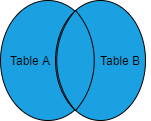
The above picture is the diagrammatic representation of the FULL OUTER JOIN of two tables.
For example,
| product_details | ||
|---|---|---|
| id | year | units |
| 7 | 2018 | 32 |
| 8 | 2019 | 23 |
| 9 | 2020 | 13 |
The above table named ‘product_details’ having three attributes id, year and units shows the number of units purchased by customers in respective years.
| customer | |
|---|---|
| id | name |
| 6 | Vivek |
| 7 | Ankit |
| 8 | Ashish |
The above table ‘customer’ contains the names of customers associated with different ids.
| purchase_details | |||
|---|---|---|---|
| id | year | units | name |
| 6 | NULL | NULL | Vivek |
| 7 | 2018 | 32 | Ankit |
| 8 | 2019 | 23 | NULL |
| 9 | 2020 | 13 | Amit |
The above table ‘purchase_details’ is the final table after the join.
In the above-shown example, the third table is the output of the FULL OUTER JOIN of the first and second tables.

