
JOIN
Joins are used in relational databases to combine data from multiple tables based on a common column between them. A foreign key may be used to reference a row in another table and join can be done based on those columns. Two or more tables may have some related data, and to combine all the data from multiple tables joins are used.
There are different types of joins in MySQL.
- INNER JOIN
- LEFT JOIN
- RIGHT JOIN
- CROSS JOIN
Note - When there is only one table involved in the join, that is called a Self Join. Self-join is used for the comparison of rows of the same table.
INNER JOIN
The INNER JOIN produces the output by combining those rows which have matching column values. Those rows from the two tables are combined and selected in the joined table having matching values for the common column.
Syntax:
SELECT column_names
FROM table1
INNER JOIN table2 ON table1.common_column=table2.common_column
INNER JOIN table3 ON table1.common_column=table3.common_column
...;
In the above syntax for INNER JOIN, one or more columns from the tables can be selected and multiple tables can be joined referencing a common column between them.
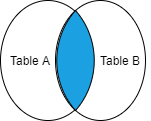
The above picture is the diagrammatic representation of the INNER JOIN of two tables. The colored area shows the joined table.
For example:
| product_details | ||
|---|---|---|
| id | year | units |
| 7 | 2018 | 32 |
| 8 | 2019 | 23 |
| 9 | 2020 | 13 |
| 8 | 2018 | 25 |
| customer | |
|---|---|
| id | name |
| 7 | Ankit |
| 9 | Ashish |
SELECT id, year, units, name
FROM product_details
INNER JOIN customer ON product_details.id=Cutomer.id;
Output:
| id | year | units | name |
|---|---|---|---|
| 7 | 2018 | 32 | Ankit |
| 9 | 2020 | 13 | Ashish |
The above table ‘purchase_details’ is the final table after the join.
Similarly, if there is one more (third) table, the third table can be joined referencing the common column between the tables.
LEFT JOIN
The LEFT JOIN returns all the rows from the left table ‘A’ and the matching rows from the right table ‘B’ in the join. The rows from the left table, which have no matching values in the right table will be returned with a NULL value in the link column. If a row from the left table does not have a matching row from the right table, the LEFT JOIN combines columns of rows from the left table with NULL values for all columns of the right table into a new row and includes this row in the result set.
Syntax:
SELECT column_names
FROM table1
LEFT JOIN table2 ON table1.common_column=table2.common_column;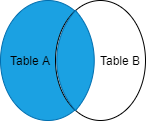
The above picture is the diagrammatic representation of the LEFT JOIN of two tables. The colored area shows the joined table.
For example:
| product_details | ||
|---|---|---|
| id | year | units |
| 7 | 2018 | 32 |
| 8 | 2019 | 23 |
| 9 | 2020 | 13 |
| 8 | 2018 | 25 |
| customer | |
|---|---|
| id | name |
| 7 | Ankit |
| 9 | Ashish |
SELECT id, year, units, name
FROM product_details
LEFT JOIN customer ON product_details.id=Cutomer.id;
Output:
| purchase_details | |||
|---|---|---|---|
| id | year | units | name |
| 7 | 2018 | 32 | Ankit |
| 8 | 2019 | 23 | NULL |
| 9 | 2020 | 13 | Ashish |
| 8 | 2018 | 25 | NULL |
In the above-shown example, the third table is the output of the LEFT JOIN of the first and second tables.
RIGHT JOIN
The RIGHT JOIN returns all the rows from the right table ‘B’ and the matching rows from the left table ‘A’ in the join. The rows from the right table, which have no matching values in the left table will be returned with a NULL value in the link column. If a row from the right table does not have a matching row from the left table, the RIGHT JOIN combines columns of rows from the right table with NULL values for all columns of the left table into a new row and includes this row in the result set.
Syntax:
SELECT Column_names
FROM table1
RIGHT JOIN table2 ON table1.common_column=table2.common_column;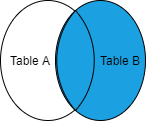
The above picture is the diagrammatic representation of the RIGHT JOIN of two tables. The colored area shows the joined table.
For example:
| product_details | ||
|---|---|---|
| id | year | units |
| 7 | 2018 | 32 |
| 8 | 2019 | 23 |
| 9 | 2020 | 13 |
| 8 | 2018 | 25 |
| customer | |
|---|---|
| id | name |
| 7 | Ankit |
| 6 | Amit |
SELECT id, year, units, name
FROM product_details
RIGHT JOIN customer ON product_details.id=Cutomer.id;
Output:
| purchase_details | |||
|---|---|---|---|
| id | year | units | name |
| 7 | 2018 | 32 | Ankit |
| 6 | NULL | NULL | Amit |
In the above-shown example, the third table (purchase_details) is the output of the RIGHT JOIN of the first and second tables.
CROSS JOIN
CROSS JOIN returns the cartesian product of rows from the tables in the join. It combines each row of the first table with each row of the second table. If there are X rows in the first table and Y rows in the second table then the number of rows in the joined table will be X*Y.
Syntax:
SELECT column_names
FROM table1
CROSS JOIN table2;
The CROSS JOIN will work like INNER JOIN if both the tables have some relationship and WHERE clause is added like shown below.
SELECT column_names
FROM table1
CROSS JOIN table2 WHERE table1.common_column=table2.common_column;
In the above diagram shown, let Table A has 3 rows and Table B has 3 rows. All the rows of Table A will be combined with all the rows of Table B. The number of rows in the joined table will be 3*3 = 9.
For example,
| vehicle_type |
|---|
| vehicles |
| Bike |
| Car |
| Jeep |
The above table ‘vehicle_type’ has one column named vehicles which contains types of vehicles.
| vehicle_color |
|---|
| color |
| Black |
| White |
| Grey |
The above table ‘vehicle_color’ also has one column which contains the color of the vehicles.
| vehicle_details | |
|---|---|
| vehicles | color |
| Bike | Black |
| Bike | White |
| Bike | Grey |
| Car | Black |
| Car | White |
| Car | Grey |
| Jeep | Black |
| Jeep | White |
| Jeep | Grey |
The above table named ‘vehicle_details’ is the final table after the join.
SELF JOIN
As the name suggests, the SELF JOIN is the join with the same table or itself. It is used to compare a row with other rows in the same table.
Syntax:
SELECT column_names
FROM table1 t1, table1 t2
WHERE join_condition;
In the above syntax, t1 and t2 are two different aliases representing the same table. As there is only one table so while writing the query it is must-have different aliases to not repeat the same name.
For example:
| students | |
|---|---|
| student_name | city |
| Ashish | Patna |
| Vivek | Patna |
| Karan | Delhi |
| Priti | Mumbai |
| Sameer | Delhi |
| Shalu | Mumbai |
| Richa | Delhi |
SELECT T1.student_name AS student1, T2.student_name AS student 2, T1.city
FROM students T1, Student T2
WHERE T1.student_name>T2.student_name
AND T1.city=T2.city;
Output:
| student1 | student2 | city |
|---|---|---|
| Vivek | Ashish | Patna |
| Sameer | Karan | Delhi |
| Sameer | Richa | Delhi |
| Richa | Karan | Delhi |
| Shalu | Priti | Mumbai |
In the above output of self join, it can be seen that according to the query the rows are compared with each other and are joined on the following conditions:
- Both students belong to the same city (T1.city =T2.city) and,
- T1.Studentname>T2.student_name

